Northern lights over Hesse / Germany – Allsky timelapse from January 19, 2026

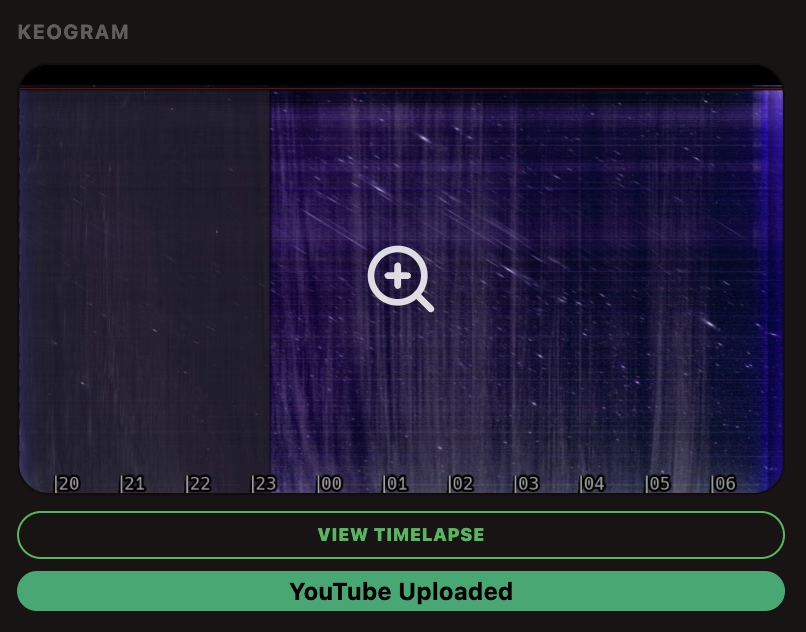
On the night of January 19, 2026, a rare celestial phenomenon could be observed in Central Europe: The aurora borealis reached as far as Hesse and was also visible over the Rodgau area.

With my permanently installed Allsky camera, this event could be recorded continuously for several hours. The video embedded below shows a time-lapse documenting the development, intensity and spatial extent of the aurora borealis.

Auroral time-lapse video

The time-lapse makes the greenish (in white) and occasionally reddish structures visible, which are caused by the interaction of charged particles from the solar wind with oxygen and nitrogen atoms in the upper atmosphere. Such sightings are only possible in Germany during strong geomagnetic activity and are correspondingly rare.

Automatic indi-allsky backup on external drive (Fritzbox NAS) – Phase 2: Files

After the database, configuration and migration of indi-allsky have already been automatically backed up to an external drive, the next step was to work on the actual files: the night images from which Timelapse, Keogramm and Startrails will later be created.

The basis for this is phase 1 of the backup, which I have described here:

Automatic indi-allsky backup on external drive (Fritzbox NAS) – Phase 1

Phase 2 is much more demanding. While database backups are comparatively small and deterministic, with image data we are quickly talking about several gigabytes per night – and about data that is not all equally valuable.

Why not simply “back up everything”?

An all-sky system produces images every night – regardless of whether the sky is clear, partially cloudy or completely unusable. If you backed up all the files blindly, even a large external hard disk would fill up very quickly.

That’s why it was clear from the start: the backup must be quality-based.
Not every night is equally valuable – and with indi-allsky this can be derived very well from the database.

And this is how I proceeded…
Automatic indi-allsky backup on external drive (Fritzbox NAS)

In this article, I describe how I back up my indi-allsky installation on my Raspberry Pi fully automatically to an external hard disk.

The official indi-allsky documentation describes very well what should be backed up – but leaves open how to turn it into a reliable, automated backup.

In my setup, indi-allsky runs permanently on a Raspberry Pi. The backup is not done locally, but on an external SSD on a Fritzbox, connected via SMB.

The aim was to consistently implement the recommendations from the official documentation: Backup and Recovery – indi-allsky and to expand it to production readiness:

  • external target
  • automatic backups
  • integrity checks
  • time-based retention
  • Mail notification in case of errors

…and this is how I proceeded!

indi Allsky live images in WordPress – structure and functionality of my plugin

Ccd6 20251227In this post, I’ll show you how I solved the integration of an Allsky live image in WordPress using my own plugin.
The goal was a high-performance display without unnecessary loading times – with server-side image optimization, automatic updating of the preview image and an overlay for the original image.

In addition, an integrated fallback informs the user if the camera or connection is temporarily unavailable.

Just check out my Liveview to see what the plugin does! 

The basis for using the plugin is:

  • the availability of indi-allsky on the web – for example under your own subdomain
  • a cleanly running WordPress installation – REST is not required
  • optional Polylang for multilingualism

In the following, I will explain the structure and the individual function blocks of the plugin step by step. You can also find the download link below.

Digital picture frame with Allsky images: Update with timelapse videos on the Raspberry Pi

After using the basic version of my Raspberry Pi setup as a digital picture frame for a few weeks in everyday life, it was clear that the system was stable – but the dashboard itself could be significantly improved.

I have described the basis here:
Raspberry Pi as a digital picture frame in kiosk mode – hardware, setup & troubleshooting

This update builds exactly on this and describes the final, corrected version, which is now running permanently and unattended.