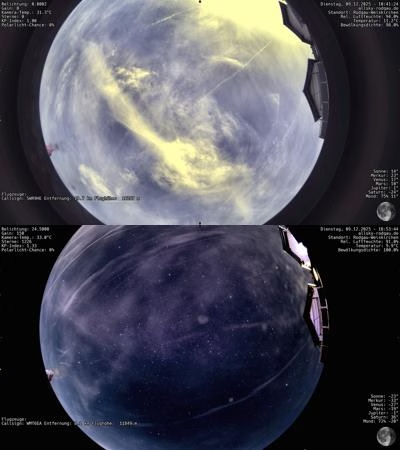
 The ZWO ASI678MC is one of the most powerful all-sky cameras for day and night operation. Its back-illuminated Sony IMX678 sensor offers high sensitivity, low readout noise and full RAW16 support. This means that both high-contrast daytime shots and brilliant night-time shots are possible – provided that indi-allsky is configured correctly.
This article describes a tried-and-tested configuration for optimum image quality by day and night. The values are adjusted to:
The aim is a setup that delivers stable, high-quality results all year round without manual intervention.
Optimal settings for the day
Day mode requires maximum dynamics, natural colors and a clean, blue sky.
Exposure and gain
| Setting | Value | Reason |
|---|---|---|
| Gain Day | 0 | Maximum dynamic range, minimum noise |
| Exposure Day | Auto | indi-allsky regulates down reliably |
| Auto Gain | ON | Avoids burnout in sun/clouds |
| Target ADU Day | 90 | Optimal for balanced RAW16 exposure |
White balance
Since daylight changes continuously, the automatic white balance delivers better results than a fixed setting.
| Parameter | Value |
|---|---|
| Auto White Balance Day | ON |
Color & gamma values
| White Balance Red Factor Day | 1.3 |
| White balance Green Factor Day | 1.0 |
| White balance blue Factor Day | 1.8 |
| Saturation Day | 1.3 |
| Gamma Day | 1.2 |
This combination produces realistic colors, strong blue in the sky and good contrasts without oversaturation.
Image processing
| Parameter | Value |
|---|---|
| Daytime Contrast Enhance | OFF |
CLAHE or other contrast algorithms appear unnatural in daylight and should remain deactivated.
Optimum settings for the night
Night mode has two central objectives: a sky that is as dark and realistic as possible and bright, clearly visible stars. In contrast to day mode, night mode requires manual color calibration.
Gain, exposure, ADU
| Parameter | Value |
|---|---|
| Gain Night | 150 |
| Exposure Max | 25 seconds |
| Target ADU | 75 |
| Auto Gain Levels | 8 |
These values prevent overexposure, keep the sky dark and emphasize stars cleanly.
Force RAW16
ZWO cameras – at least my ASI678MC – apparently switch to 8 bit in the dark.
To prevent this from happening(see also here):
{ "CCD_VIDEO_FORMAT": { "on": ["ASI_IMG_RAW16"], "off": ["ASI_IMG_RAW8"] } }This means that the format remains consistent even during the day → night transition.
Manual white balance at night
Why no automatic white balance?
AWB interprets star colors as a color cast and makes the sky purple.
The following values provide neutral, astronomically realistic colors.
| Parameter | Value |
|---|---|
| White balance red night | 1.2 – 1.3 |
| White balance green night | 1.0 – 1.1 |
| White balance Blue Night | 1.3 – 1.4 |
| Saturation Night | 1.1 – 1.3 |
| Gamma Night | 1.3 – 1.5 |
Result: dark sky, neutral stars, clear cloud structures.
Night stretching
Stretching determines how bright or dark the image appears.
| Parameter | Value |
|---|---|
| StdDev StdDevs | 1.5 |
| StdDev Gamma | 1.4 |
| MTF Shadows | 0.02 |
| MTF Midtones | 0.32 |
| MTF Highlights | 1.0 |
Generate these values:
- an authentically dark night sky
- stars that are clearly visible at the same time
- stable cloud detail without noise
Contrast enhancement at night
CLAHE is particularly effective at night for faint stars.
| Parameter | Value |
|---|---|
| Nighttime Contrast Enhance | ON |
| CLAHE Clip Limit | 1.2 – 1.5 |
| CLAHE Grid Size | 8 |
| 16-bit Contrast Enhance | OFF |
Moon mode
There is a risk of burning out when the moon is bright.
Recommended settings:
| Parameter | Value |
|---|---|
| Moon Gain | 25 |
| Moon Exposure Max | 8 seconds |
| Moonmode Contrast Enhance | OFF |
This keeps the moon and landscape clear and balanced.
Complete overview of my current settings

tag
- Gain: 0
- Auto Exposure: ON
- Auto White Balance: ON
- WB Red: 1.3 / Green: 1.0 / Blue: 1.8
- Saturation: 1.3
- Gamma: 1.2
- Target ADU: 90
- Contrast Enhance: OFF

Night
- Gain: 150
- Max Exposure: 25 s
- Force RAW16
- WB Red: 1.2 / Green: 1.0 / Blue: 1.4
- Saturation: 1.2
- Gamma: 1.4
- StdDev: 1.5 / Gamma: 1.4
- MTF: 0.02 / 0.32 / 1.0
- Target ADU: 75
- Contrast Enhance: ON (CLAHE 1.2)
Moon
- Gain: 25
- Max Exposure: 8 s
- Contrast Enhance: OFF
Day-night transition and moon mode
The automatic transition between day, night and moon mode is crucial for ensuring that the camera runs stably without you having to intervene manually.
indi-allsky controls the transition primarily via the altitude of the sun and moon as well as the moon phase – I use the following values:
- NIGHT_SUN_ALT_DEG: -10 – From a sun altitude below -10°, the system switches to night mode. Above this, the day mode runs with the day settings (Gain 0, Target ADU Day 90).
- NIGHT_MOONMODE_ALT_DEG: 10 – If the moon is higher than 10° above the horizon, moon mode can be activated.
- NIGHT_MOONMODE_PHASE: 40 – Moon mode becomes relevant from a moon phase of 40 %; below this, regular night mode remains active.
The operating sequence typically looks like this:
- During the day:
Day mode with gain 0, target ADU Day 90, automatic white balance and deactivated contrast enhancement. This ensures maximum dynamics and natural colors. - Twilight → Night:
As soon as the sun falls below -10°, indi-allsky switches to night mode with Gain 150 and Target ADU 75. Image processing then relies on the night parameters (manual white balance, Gamma Nights, Night Stretch, CLAHE). - Bright moon:
If the moon is higher than 10° and the phase is above 40 %, Moon Mode can take effect. Here you work with a significantly reduced gain (e.g. gain 25) and shorter exposure times to avoid burnout around the moon.
Important in practice:
The day-night transition is deliberately conservative in your configuration (sun elevation -10° instead of -6°). This avoids switching to full night mode too early in nautical twilight while the sky is still relatively bright visually. At the same time, Moon Mode ensures that nights with a bright moon do not appear “overexposed” and that stars around the moon are not completely blown out.