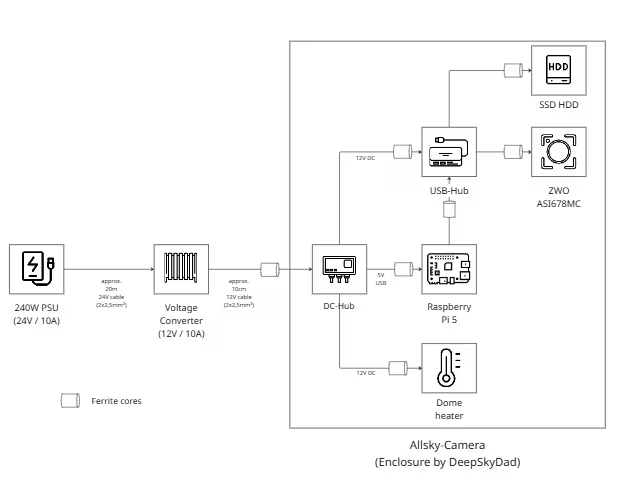
This is how I stabilized the power supply of my Allsky camera – clean cabling and a proper buffer

Wiring plan allsky en
Klick for large image!

An Allsky camera is a typical “keeps running” project – until it suddenly stops doing so. In my case, it wasn’t a single defect, but a combination of long cables, voltage drops and small faults that only became noticeable after weeks or in unfavorable weather conditions.

In this article, I show why I fundamentally revised my power architecture: away from “works somehow” and towards a robust, documented solution for unattended continuous operation outdoors.

Complete backup of the Raspberry Pi microSD card – indi-allsky backup

indi-allsky on a Raspberry Pi system regularly writes data (logs, databases, images, videos).
microSD cards are only designed for this to a limited extent and can fail without warning in the worst case.

A 1:1 backup of the entire SD card is possible in an emergency:

  • Insert a new microSD card
  • Restore the backup
  • System starts exactly in the previous state

Optimum day and night configuration for the ZWO ASI678MC in indi-allsky (2025-Howto)

Combined 400pxThe ZWO ASI678MC is one of the most powerful all-sky cameras for day and night operation. Its back-illuminated Sony IMX678 sensor offers high sensitivity, low readout noise and full RAW16 support. This means that both high-contrast daytime shots and brilliant night-time shots are possible – provided that indi-allsky is configured correctly.

This article describes a tried-and-tested configuration for optimum image quality by day and night. The values are adjusted to:

The aim is a setup that delivers stable, high-quality results all year round without manual intervention.

Optimal debayering for the ZWO ASI678MC in indi-allsky

The right choice of Bayer pattern is crucial for correct colors, clean day images and error-free night image processing. Like almost all modern ZWO color sensors with Sony Starvis II technology, the ASI678MC uses an RGGB pattern. If this is set incorrectly or automatically recognized incorrectly, typical artefacts occur.

Below are the most important findings from the practical tests and the indi-allsky documentation.

Activate automatic updates on the Raspberry Pi

Automatic updates on a Raspberry Pi are – in addition to other tweaks that I have presented here – particularly useful to ensure the security of the system. Regular updates close known security gaps and keep the operating system stable and up-to-date. Important security patches are installed automatically without manual intervention, which minimizes the attack surface for hackers and malware. In combination with email notifications, you are always informed when an update has been carried out or a problem has occurred. This ensures maximum security and reduces maintenance costs. And this is how it works: