 I wanted to add additional information to my all-sky images: Aircraft data directly in the image, including callsign, altitude and direction. Since I didn’t want to run my own ADS-B setup, I used the Open Data API from adsb.fi and built a solution that works with indi-allsky.
With the following instructions, you can use adsb.fi to receive up-to-date information on aircraft around the location of your Allsky camera every minute and have it displayed directly on the Allsky photo.
Why adsb.fi?
adsb.fi offers a publicly accessible, JSON-based API that is compatible with the ADSB Exchange v2 API. This provides very detailed information:
- ICAO-Hex
- callsign
- Position (lat/lon)
- Barometric or geometric altitude
- Speed, course
Use is permitted for personal, non-commercial purposes – making the service ideal for a private all-sky project.
Goal: a dump1090-compatible aircraft.json for indi-allsky
indi-allsky can only display ADS-B if a file in dump1090 format is available – specifically an aircraft.json. Since I do not operate a dump1090 receiver, the approach was:
- Retrieve data from adsb.fi
- Convert to the appropriate dump1090 JSON format
- Provide the result via Apache under a URL
- Have indi-allsky point to this URL
The result: Flight overlay directly on the Allsky night images – updated live.
Python adapter: adsb.fi → dump1090 JSON
I have built a small Python application that loads the current flight data every minute and stores it as aircraft.json.
Path structure:
/home/dante/adsb_adapter/
 ├── adsbfi_to_aircraftjson.py
 └── out/aircraft.json
Create Virtualenv and install requests:
python3 -m venv ~/adsb_adapter
~/adsb_adapter/bin/pip install requests
mkdir -p ~/adsb_adapter/out
Python script adsbfi_to_aircraftjson.py – important: For xxx you have to enter your latitude and longitude!
/usr/bin/env python3
import time
import json
import os
import requests

LAT = xxx
LON = xxx
DIST_NM = 100

OUT_DIR = "/home/dante/adsb_adapter/out"
OUT_FILE = os.path.join(OUT_DIR, "aircraft.json")

API_URL = f "https://opendata.adsb.fi/api/v3/lat/{LAT}/lon/{LON}/dist/{DIST_NM}"

def fetch_adsb():
    resp = requests.get(API_URL, timeout=5)
    resp.raise_for_status()
    return resp.json()

def convert_to_dump1090(data):
    ac_list = data.get("ac", [])
    aircraft = []

    for ac in ac_list:
        lat = ac.get("lat")
        lon = ac.get("lon")
        if lat is None or lon is None:
            continue

        rec = {
            "hex": ac.get("hex") or ac.get("icao") or "",
            "squawk": ac.get("squawk"),
            "flight": (ac.get("flight") or "").strip(),
            "lat": lat,
            "lon": lon,
            "altitude": ac.get("alt_geom") or ac.get("alt_baro"),
            "speed": ac.get("gs"),
            "track": ac.get("track"),
            "messages": ac.get("messages", 0),
            "seen": 0.0
        }
        aircraft.append(rec)

    now_ts = time.time()
    total_messages = sum(a.get("messages", 0) for a in aircraft)

    return {
        "now": now_ts,
        "messages": total_messages,
        "aircraft": aircraft
    }

def main():
    os.makedirs(OUT_DIR, exist_ok=True)

    try:
        data = fetch_adsb()
        aircraft_json = convert_to_dump1090(data)

        tmp = OUT_FILE + ".tmp"
        with open(tmp, "w") as f:
            json.dump(aircraft_json, f, separators=(",", ":"))
        os.replace(tmp, OUT_FILE)

    except Exception as e:
        print(f "Error updating aircraft.json: {e}")

if __name__ == "__main__":
    main()
Test run:
~/adsb_adapter/bin/python ~/adsb_adapter/adsbfi_to_aircraftjson.py
The aircraft.json file is then located under:
/home/dante/adsb_adapter/out/aircraft.json
Deploy via Apache under your own URL
So that indi-allsky can access the file, it needs an HTTP or HTTPS URL. I have chosen a separate path for this(/adsb/data) to avoid conflicts with any existing dump1090 configuration.
Create a new Apache configuration:
sudo nano /etc/apache2/conf-available/adsb_alias.conf
Contents:
Alias /adsb/data /home/dante/adsb_adapter/out

<Directory "/home/dante/adsb_adapter/out">
    Require all granted
    Options -Indexes
</directory>
Activate configuration and reload Apache:
sudo a2enconf adsb_alias
sudo systemctl reload apache2
Test via curl:
curl -k https://localhost/adsb/data/aircraft.json
The output should show the JSON from aircraft.json.
Automatic update via cron
To ensure that the adapter fetches new data regularly, it runs via cron every minute:
crontab -e
Entry:
* * * * * * /home/dante/adsb_adapter/bin/python /home/dante/adsb_adapter/adsbfi_to_aircraftjson.py >/home/dante/adsb_adapter/adsb_adapter.log 2>&1
This updates the aircraft.json every minute.
Configuration in indi-allsky
In the ADS-B settings of indi-allsky, I enter the URL as the data source:
https://localhost/adsb/data/aircraft.json
indi-allsky recognizes the dump1090-compatible format and displays the aircraft in the image.
Display altitude with thousands separator
indi-allsky supports Python-like number formatting in the image labels. Example of a complete overlay per aircraft:
{flight:s} - {altitude_m: .0f} m - {dir:s} - {distance:0.1f} km
The output then looks like this, for example:
DLH4AB - 10 850 m - SW - 32.4 km
With this setup, the ADS-B overlay for my Allsky camera runs completely without its own antenna – the data comes via the Open Data API from adsb.fi. The Python adapter provides the appropriate dump1090 format, Apache provides the file under a fixed URL and indi-allsky uses the data for the aircraft overlay in the image.
Sample image
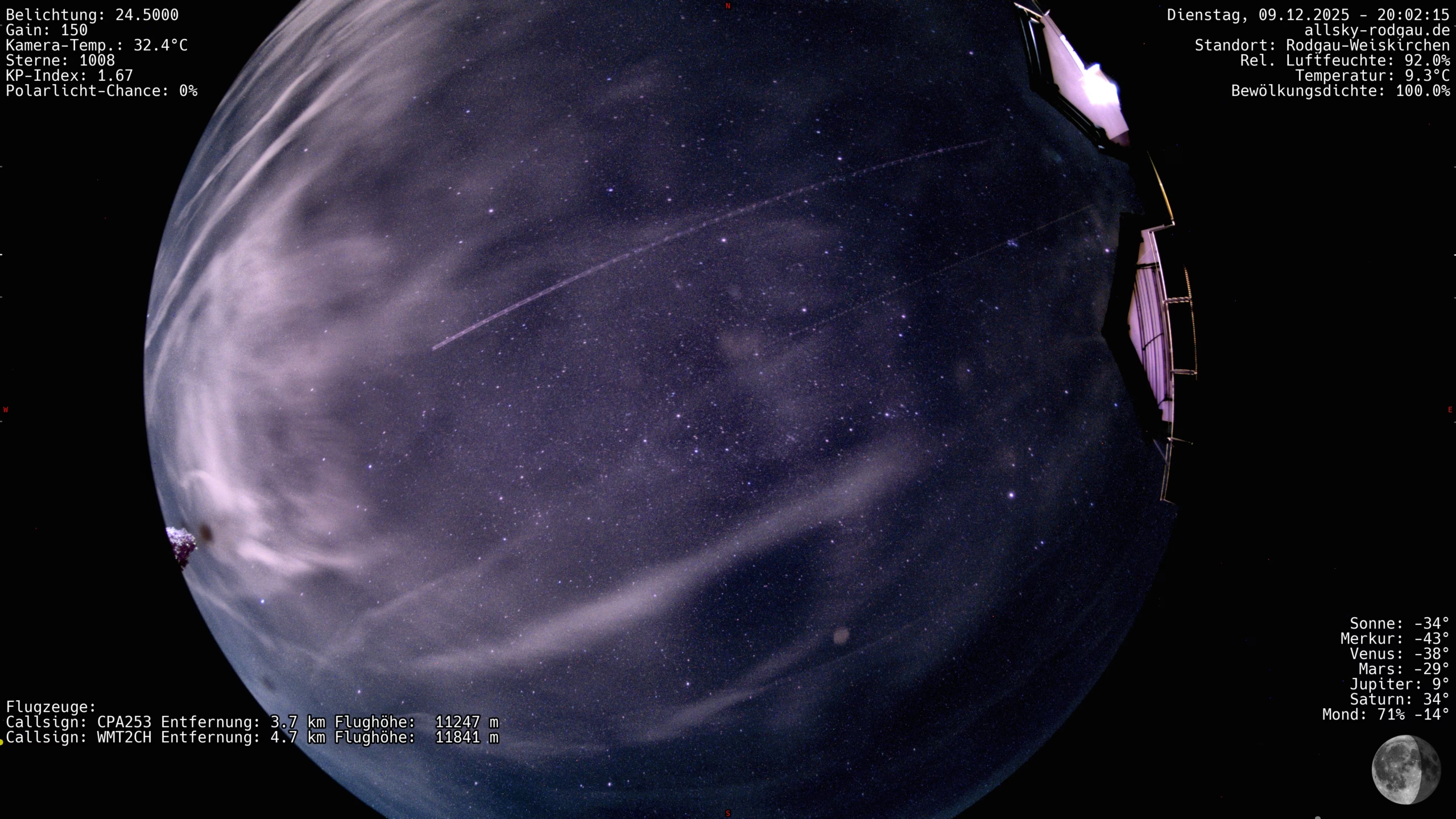
Here you can clearly see two aircraft, relatively centered in the image, along with their call signs, distances, and flight altitudes.
CPA253 is a Boeing 777-300ER, while WMT2CH is a significantly smaller Airbus A320-200 – which is why CPA253 is very clearly visible and WMT2CH is somewhat fainter, especially since it is flying around 600 meters higher.
The live photo page at allsky-rodgau.de displays the aircraft currently visible with links so that you can see exactly what type of aircraft it is.
UPDATE: Security Settings
Step 1: Open the Apache configuration
sudo nano /etc/apache2/sites-enabled/indi-allsky.conf
Step 2: Scroll to the HTTPS VirtualHost
<VirtualHost *:443> ... </VirtualHost>
Step 3: Locate the ADS-B section
# ADSB Aircraft tracking Alias /dump1090/data /run/dump1090-mutability Alias /dump1090 /usr/share/dump1090-mutability/html
Below this, the following block should already exist — if not, add it:
<Directory "/var/www/html/adsb/data"> Options -Indexes Require all granted </Directory>
Step 4: Insert the <Files> block directly below and save the file
 <Files "aircraft.json"> RewriteEngine On
# If a referer is present, it must match your own domain
RewriteCond %{HTTP_REFERER} !=""
RewriteCond %{HTTP_REFERER} !^https://access\.allsky-rodgau\.de [NC]
RewriteCond %{HTTP_REFERER} !^https://allsky-rodgau\.de          [NC]
RewriteRule .* - [F]
# If no referer is present, allow access
Step 6: Validate Apache syntax
sudo apachectl configtest
Step 7: Reload Apache
sudo systemctl reload apache2